Posts

Cloud Service Topologies Explained
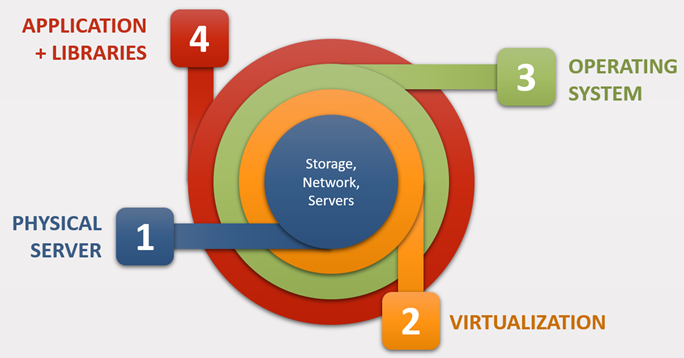
Image
Imagine a company wants to commission a new application.  The application needs computing resources to be able to run. On many occasions the app references libraries, frameworks, software development kits (SDKs) and other software to run. The app and support programs are installed on a particular version of an Operating System (OS). To run, the solution requires resources such as CPU, memory, disk storage and networking. These are provided by physical servers. Virtualization lies between the Physical Servers and the OS and makes computing environments independent of physical infrastructure. A single app may require multiple virtual machines (VM). This may be necessary for redundancy purposes and/or because the application requires additional components that would be installed on separate VMs. Typically, the database used by the app or it web front end may reside on their own VMs. If this application was running on-premises one would...

Analysis of the Python's TKinter Spinbox control

Image
This article borrows from the code repository   Password Generator GUI written in Python using the TKinter module . It explains how one can programmatically make the Spinbox control function correctly with a numeric range both visually and operationally. It also opens a discussion on this control to make it more efficient. This article and the source code can be downloaded from:  Github TKinter's Spinbox control The Spinbox control  " is an Entry with increment and decrement arrows. It is commonly used for number entry or to select from a list of string values " . The control accepts input through the up or down arrows or by typing directly into the text box. While the control has built-in functionality that allows range checking when the up and down arrows are pressed, the same is missing when one types directly into the text box. This means that one can type anything into a Spinbox. This article describes this limitation and explains how it can be addressed. The Solutio...

Password Generator GUI (Python w/TKinter)

Image
  This utility will allow you to generate a password based on the symbol sets you specify and desired length. The password is copied to the clipboard for easy pasting. Property Details Password Length From 1 to 100 Use Numbers Generated password may include [0-9] Use lower letters Generated password may include [a-z] User upper letters Generated password may include [A-Z] Use special characters Generated password may include [`~!@#$%^&*()_-+={}[]|:;"'<>,.?/] Force 1st char as number / letter The first character of the password cannot be a symbol Avoid confusing characters The password will not include the following [lIO01] The Generate Password button is used to produce a new password. On Windows and Mac systems the generated passwords are automatically copied to the clipboard making the copy icon redundant. On Linux systems a  Not implemented error  could be thrown. The utility should work around this limitation. For information on how to install this functiona...

bnkSEPA : Excel to SEPA Credit Transfers (SCTE) Electronic Payment

Image
Last update: 202205 Version - 1.37.00 Project Repository:  https://www.github.com/chribonn/bnkSEPA Project Overview This is an engine written in Python that takes a Microsoft Excel spreadsheet and converts into a password-protected file that will be processed by Financial Institution. Other financial institutions that use the same format may also benefit from this  ETL  ( Extract Transform Load ) engine. The Excel workbook consists of the following worksheets: Payment Information Record - This sheet holds information of the payee account. This will be entity that will upload the file to the bank Credit Instruction Record - This sheet contains the transactions that are to be processed. The maximum number of transactions can be increased (this has already happened). An increase in the number of transactions will require changes to both the Excel and the Python code. Control - This worksheet performs the following functions: It stores within it the password provided by the b...

ETransL Technical: Update MetaData

Image
Quick overview This module is invoked by all Operations except  SK  (which does nothing). The invocation takes place before the actual operation is evaluated. It evaluates the  MetaData  string, and replaces any reference to a Title within the Template with its data. The RegEx pattern the solution looks for is '<;<(.+)>;>'. There can be multiple Titles. The module looks up Titles that precede the one being processed. If a Title is not found, the string is treated literally and a warning is written to the log file. Example <;<Fare_1912>;> x <;<Inflation>;> Before Operation  CO  is evaluated, this module will replace  <;<Fare_1912>;>  and  <;;>  with the results obtained in those Titles. If the result of Title  Fare_1912  was 7.63 and the result for  Inflation  was 29.98, the MetaData string would be updated as shown below before the module related to Operation ...

ETransL Technical: Process Transactions

Image
  Quick overview The module performs the transformation. Each row in the transactions file will correspond to an appended entry in the transformation file. Any errors or warnings are written to the log file. It can be further subdivided into three: PreProcessing tasks Operations executions PostProcessing tasks Flow Diagram Solution walk through Initialise the Transformation file Initialise the  Transaction Counter  to zero Initialise the  Current Row  to the row reference in the transaction file While  Current Row  is less than or equal to the  Last Transaction Row  or the row referenced by  Current Row  is not blank Increment the  Transaction Counter  by 1 Initialise the  Output String  that will eventually be written to the transformation file Start Processing the Template file starting at column B onwards until there is a blank column. If the Operation is not one of " SK ,  CO ,  MC ,  TX ,...